
Base64 Encoder/Decoder
Comments
Similar Coding Tools
See AllImage to Base64 Converter
Convert images into Base64 string for different image formats like PNG, JPEG, GIF, SVG
URL Encoder/Decoder
Encode your URL by escaping characters that may break your navigation and decode it
HTML Encoder/Decoder
Encode or decode your HTML by replacing special characters into equivalent escape forms
What is Base64 Encoder/Decoder?
Base64 Encoder/Decoder is a free online utility for converting text and binary data to Base64 format and decoding it back. Base64 is a group of binary-to-text encoding schemes that represent binary data in an ASCII string format by translating it into a radix-64 representation.
This is particularly useful when you need to transmit data over media that only support text, or when you want to embed images or files directly into HTML or CSS using Data URIs. It's a standard tool for developers working with APIs, web services, and email systems.
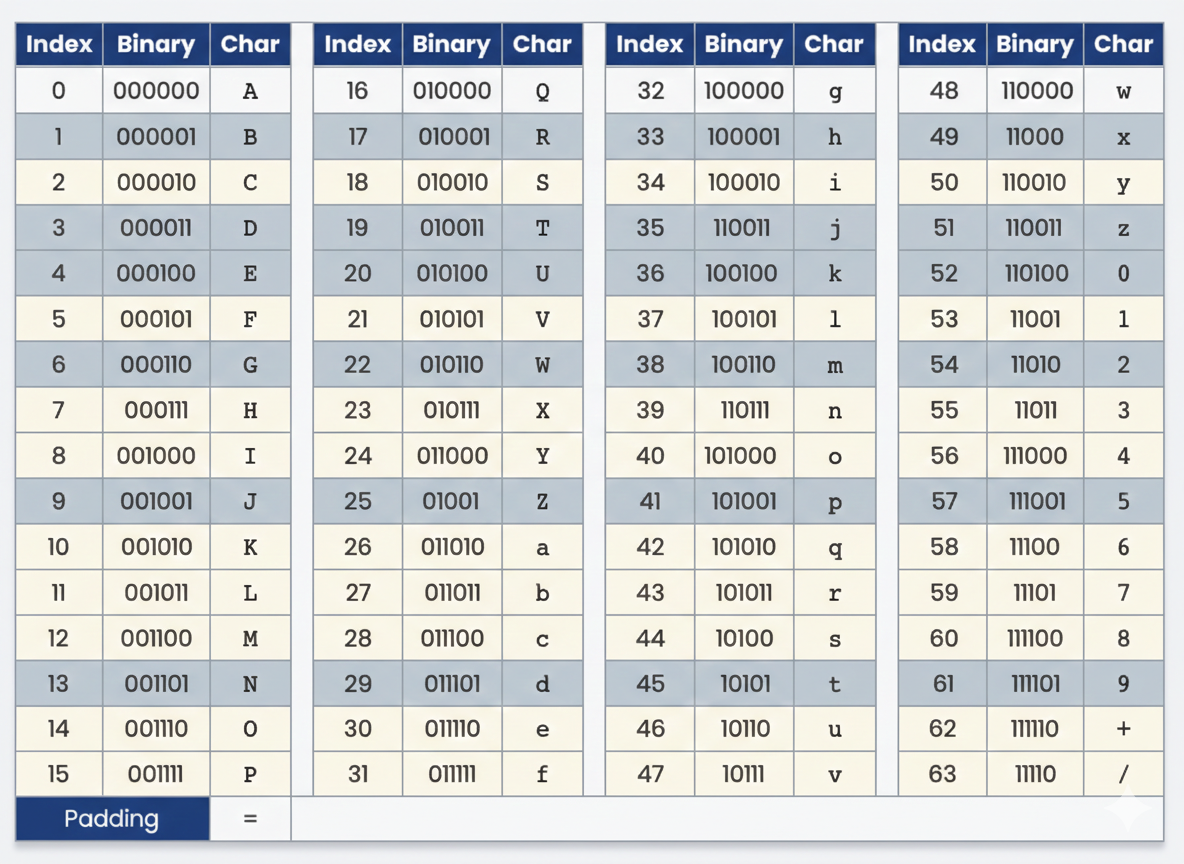
Base64 Table
How to use Base64 Encoder/Decoder?
Follow these simple steps to perform encoding or decoding:
- 1
Select the mode (Encode or Decode) from the toggle at the top.
- 2
Paste your input text into the input textarea or upload a file using the 'Upload File' button.
- 3
Click the primary action button in the center (e.g., 'Encode to Base64').
- 4
The result will appear in the output field below.
- 5
Click the 'Copy Result' button to copy the generated data to your clipboard.