 10016
10016Easily find text converters, image editors, and developer utilities.
Censor photos and hide faces by pixelating, blurring, or adding black bars to selected regions.
Censor photos and hide faces by pixelating, blurring, or adding black bars to selected regions.
Upload an image to censor
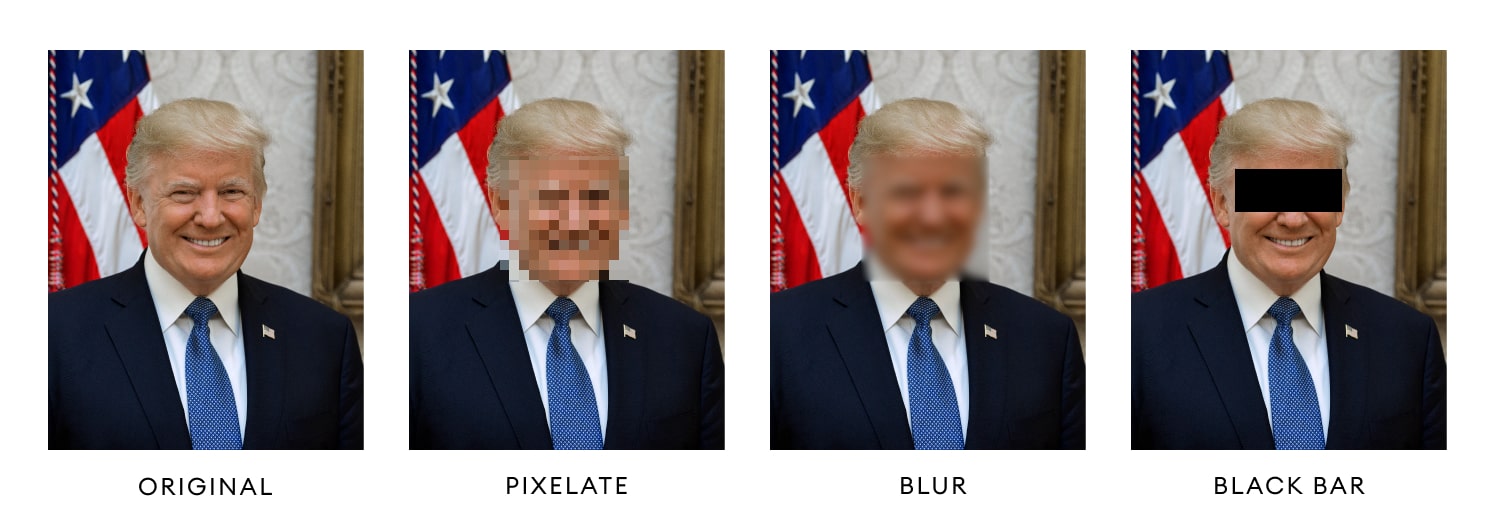
Photo Censor is a free online tool for censor photos and hide faces in a photo by pixelate or blur the selected region or putting a black stripe in the desired area. Here is 3 different censorship method that is used in image process:
Pixelate: When an area is selected in a photo, this region will be pixelated, and it will look like a low resolution region. For hiding faces in a photo, just select the face or eyes of a person you want to hide, set the unit width and height of the squares in pixels, and censor the image. Pixelating a photo is the most common way of image censorship.
Blur: By making a region blurry, you can hide a person's face, but since it is not effective as pixelate, people may still recognize the person whose face is censored. For preventing this, set the strength of blur so that the face become unrecognizable.
Black Bar: It is the most dominant way of censoring face of a person. Select the region you want to hide in the face. You can select only the eyes or the full face. When you click Censor button, it will hide that region and put a black stripe in the photo instead.
This is a side-by-side comparison between each photo censor type.
How what is online photo censor? works
For censoring faces in photos, you can follow these steps.