 10016
10016Easily find text converters, image editors, and developer utilities.
Generate secure random passwords with customizable options
Generate secure random passwords with customizable options
Strong Random Password Generator is a free online tool for generating strong random passwords in which you can set the length and character set of the password. It works like a password generator and password strength meter at the same time. People generally use weak passwords that includes their names, surnames, birthdays, and other personal information. The reason is to remember it easily but with advanced password hacking methods, it makes it easier for hackers to crack the passwords within seconds. It is very crucial to have a strong password to protect your account especially if you are not using 2FA (2 Factor Authentication) like SMS or email verification.
Here you can see an easy versus strong password together. It is even visually clear that the strong password is much more secure than the easy password.
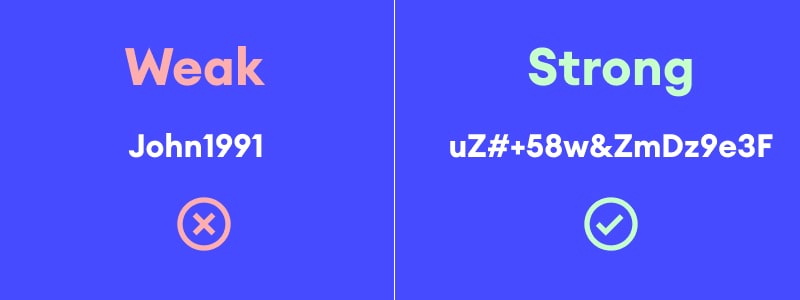
Easy vs Strong Password Comparison
Hackers are using different methods to crack passwords. Most widely used methods are brute force, dictionary attacks and rainbow table attacks. If you want to protect your account to these attacks, you need to use strong passwords.
Brute force is a method that iterates over all possible passwords by using character sets and checks if they are correct. If the website that you use the password is not secure and does not have a protection for multiple login attempts, hackers may use this method. For protecting yourself for such attacks, you need to use different character types like lowercase letters, uppercase letters, numbers, and special characters. If diversity of the characters used in the password is high and total number of characters in the character set is big, it becomes a time and energy consuming process for the attacker and it becomes difficult to crack the password.
Dictionary attack and rainbow table attack is very close to each other. In both methods, the attacker tries to guess the password by using a dictionary of words and common password list. The difference is that in the dictionary attack, attacker uses common password list and try to login your account with these passwords programmatically. In rainbow table attack, the attacker has already gotten the database of the credentials stored. In general, passwords are stored as hashes like MD5, SHA256 or SHA512. Rainbow tables contain common passwords and their hash equivalents. The hacker tries to guess the password by using the hash values of the passwords. For protecting your account from these attacks, you need to avoid using words, common patterns, consecutive numbers, and personal information in your passwords.
Another way that is not stated above is social media engineering. It is a technique used by people who know your identity and want to exploit your account. Attackers make a deep study on search engines and social media sites about the victim and get as much information as possible like the name of your mother or father, the name of your pet, your birthdate, your birthplace, the schools you finished, or the companies you worked for. The attacker then uses this information to try to guess the password. There are tools that gets all these information as an input and make combinations by using them to narrow down the possibilities about your password. Therefore, using anything related with yourself in your passwords is not a good idea.
It is important to mention "phishing" when talking about passwords and password creation. It is a technique used by hackers to steal your personal information including passwords by using fake websites. Thus, it is very important to check the landing url before clicking any link. If you want to navigate an important link, it is better to use a bookmark instead of clicking a link from an unknown website or email.
It is very important to use 2FA (2-factor authentication) if possible as it is impossible for someone to login to your account even he or she knows your password. In addition to SMS, voice or email verification, there are many authenticator apps like Google Authenticator, Authy, or Microsoft Authenticator for protecting you from such malicious activities.
For protecting your personal accounts, it is advised to use at least 2 different email accounts for password verification. One can be used for more important accounts and other can be used for the ones that is less important or for websites which looks risky in terms of security.
In all cases, you will need a secure password generator to create your new password in a trustworthy environment. Strong Random Password Generator is a free tool for this purpose which works on your browser-only. This protects your newly generated password from network sniffing and other attacks.
Here is a list of dos and don'ts for protecting your account credentials.
You can generate random strong passwords with the following guide.