 10016
10016Easily find text converters, image editors, and developer utilities.
Blend two colors and find interpolated colors between them
Blend two colors and find interpolated colors between them
Color Mixer is a free online tool for blending two colors and find the interpolated colors just between these two. You can either enter a HEX color or an RGBA color with opacity as input and the tool calculates the mixed color by making an interpolation. It finds the color just between these two colors by blending these HTML colors.
You can define step size for interpolation, that means you can find all colors between 2 HTML colors in n steps. You can select step size between a range from 1 to 10. By using steps, you can get a color spectrum between 2 colors or find shades of a tone.
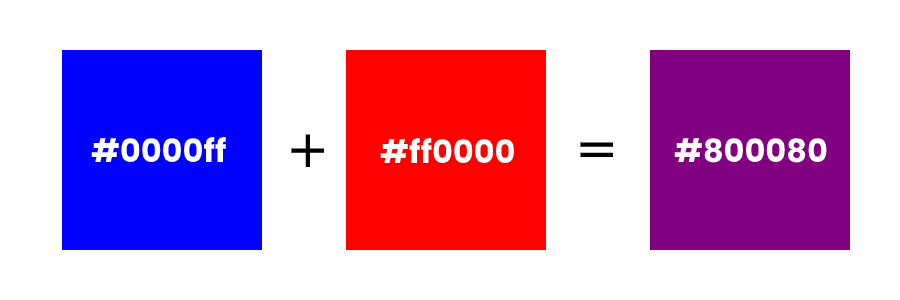
Here is an image showing how 2 colors are mixed. When blue and red are blended, you get purple. In terms of rgba, blue is rgb(0, 0, 255) and red is rgb(255, 0, 0). When these 2 colors mixed, the result in rgba is rgb(128, 0, 128) which is the color code of purple. It is basic interpolation.
The situation is a little complicated when alpha (opacity) of colors is different than 1. But, since there is a math in color coding, it's not rocket science. The tool works like an online HTML color blender, and it can mix either solid or opaque colors.
How what is online color mixer? works
You can mix two colors and get the color code of mixed colors by following these steps.