 10016
10016Easily find text converters, image editors, and developer utilities.
Convert SVG stroke elements to fill elements without altering visual appearance. Ensures cross-platform consistency.
Convert SVG stroke elements to fill elements without altering visual appearance. Ensures cross-platform consistency.
Convert SVG images to PNG format with adjustable scale. Maintain quality at any size.
Generate random SVG blob shapes with adjustable complexity and export as code or file.
Create SVG patterns using different shapes and download them as SVG or image files.
SVG Stroke to Fill Converter is a professional-grade free online tool that converts SVG stroke elements to fill elements without altering the visual appearance of your vector graphics. SVG files often utilize stroke attributes to define lines, paths, and shapes, which can lead to significant rendering inconsistencies across different browsers, design software, and platforms. This stroke-to-fill conversion tool ensures your SVG icons, illustrations, and graphics maintain pixel-perfect consistency regardless of where they're displayed.
SVG stroke rendering problems are particularly problematic when scaling vector graphics. As stroke widths scale proportionally, they can appear too thick or too thin depending on the viewing context. Additionally, stroke properties like line caps, joins, and dash patterns may render differently across platforms. By converting these strokes to equivalent fill paths, this tool eliminates these inconsistencies while preserving the exact visual appearance of your original vector graphics.
This SVG optimization tool is especially valuable for web designers, UI/UX professionals, and developers working with scalable vector graphics in cross-platform environments. The converted SVG files with fills instead of strokes are ideal for websites, mobile applications, design systems, icon libraries, and any project requiring consistent vector rendering.
Stroke-to-fill converter utilizes the powerful oslllo-svg-fixer library, which intelligently analyzes each SVG path and converts complex stroke patterns into equivalent fill paths. This advanced algorithm handles even the most intricate SVG elements including curved paths, complex line patterns, and multi-stroke designs while ensuring the visual output remains identical to the original.
Why Convert SVG Strokes to Fills? Converting SVG strokes to fills solves numerous technical challenges and provides several important benefits:
Cross-platform consistency: Eliminates rendering differences between browsers, operating systems, and design applications. Better scaling behavior: Maintains visual consistency when scaling SVG images to different sizes. Improved compatibility: Ensures compatibility with software that has limited support for advanced SVG stroke properties. Print-ready graphics: Creates more reliable vector graphics for printing and physical media. Simplified SVG structure: Makes SVG files more predictable for developers and design tools. Consistent animation: Provides better results when animating SVG elements across different platforms.
Common SVG Stroke Problems Solved by Fill Conversion Converting strokes to fills resolves many common SVG rendering issues that designers and developers encounter:
Inconsistent stroke widths when scaling SVGs across different devices and viewport sizes Line cap and join inconsistencies where corners and endpoints appear differently across browsers Stroke dash pattern rendering differences that cause dotted or dashed lines to display incorrectly SVG animation glitches when animating stroke properties in cross-platform environments Print output discrepancies where vector graphics with strokes print differently than how they appear on screen Mobile app rendering issues where SVG strokes may not display correctly in various mobile frameworks
Technical Specifications SVG stroke to fill converter supports:
All standard SVG stroke properties including stroke-width, stroke-linecap, stroke-linejoin, and stroke-dasharray Complex path elements with multiple nested strokes SVG files of any size or complexity (though very large files may take longer to process) Preservation of all other SVG attributes and properties including colors, gradients, and opacity Complete handling of all SVG element types: paths, rectangles, circles, ellipses, polylines, and polygons Retention of original SVG viewBox and dimensions
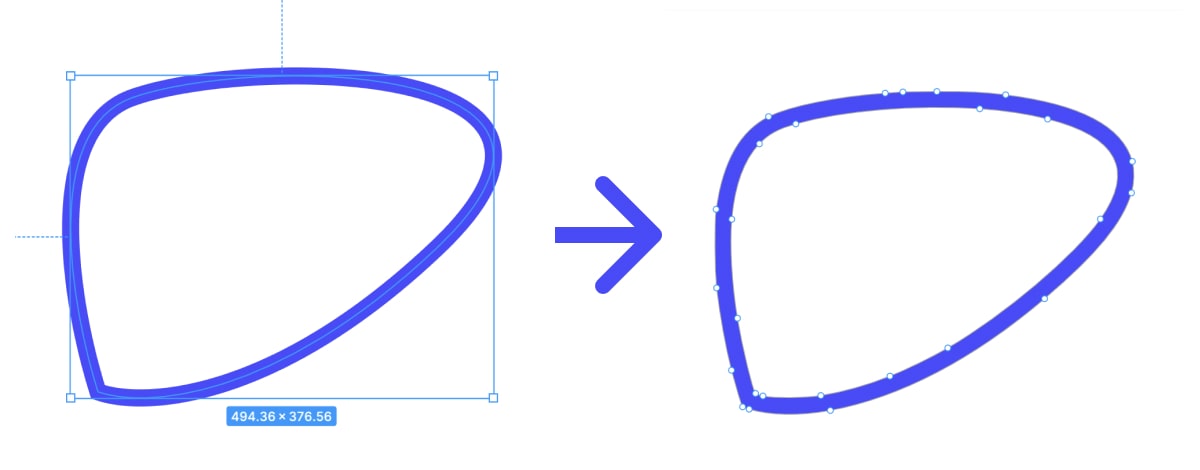
How what is online svg stroke to fill converter? works
Conversion process is simple, secure, and completely free. Follow these easy steps to transform your SVG files:
The converted SVG file maintains identical visual characteristics to your original design but with enhanced cross-platform compatibility.