
JSON Tree Viewer
JSON Tree View
Comments
Similar Coding Tools
See AllWhat is Online JSON Tree Viewer?
JSON Tree Viewer is a free online tool for converting raw JSON data into JSON tree view. JSON (JavaScript Object Notation) is a tree-like data format where subbranches may be nested in parent branches. If you have a raw object or array data which you want to explore in JSON tree view, this tool will be the best fit for you. You can collapse or expand each branch as well as add, edit, or delete with inline editing tools.
There are 37 different color themes for JSON tree view, some are light themes while some are dark. You can select any of them according to your needs.
There are many settings you can use in JSON tree view. Data count and types may be listed right before each data, and you can change expand/collapse limits easily by selecting from options. Also, you can set indent size and increase readability according to needs. If you need particular data from a custom branch, you can enable clipboard and get data of the required node.
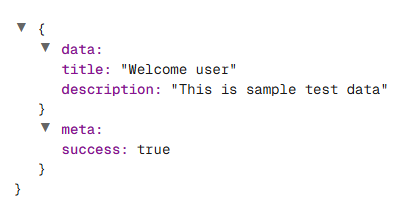
JSON Tree View Example for manifest.json file
How to use Online JSON Tree Viewer?
For viewing your raw JSON object or array in JSON tree view, follow these steps:
- 1
Paste your raw JSON data in the input field. It may or may not be formatted properly. The tool will handle formatting for you. Even if you use JSON without double quotes for keys, which is called "Relaxed JSON" or "Unquoted JSON", the tool will add them automatically out of the box.
- 2
Select your themes and change settings according to your needs. You can enable or disable CRUD operations anytime.
- 3
Start exploring your data in tree view. If you want to save your data as a .json file, there is a button at the end for this purpose.